
Tuesday, March 19, 2013
1st Graders Create Their First Caldecott iMovie
As a followup to reading this year's Caldecott award winning books, each of the 1st graders put together their own iMovie! It gave them an opportunity to learn how to create a video in iMovie. For their movies, they learned how to add images of the books and reorder them based on their preferences. They recorded their voices, took "selfies", added background music and even learned how to manage the Ken Burn scrolling effect. It was a great learning adventure!!
Wednesday, February 13, 2013

Tuesday, January 22, 2013
And The Winner Is....Green...at Least at OHE!
Every year, the nation's childrens' librarians wait for the announcement of the year's Caldecott award winning books. These books are considered by some to be the year's best children's picture books. This year, when the nominees where announced, I quickly ordered each of them on Amazon. While I awaited their arrival, I created a YouTube playlist of the book trailers for each book. Once the1st graders viewed the trailers, they joined my enthusiasm!
We decided to take our own class vote to determine who we wanted to win. I created a simple survey in Google Forms to gather our votes. First graders gave the first place award to the book Green. On January 28, the Caldecott winner was announced and the winner was This Is Not My Hat. Oh well...we like that one too!

We decided to take our own class vote to determine who we wanted to win. I created a simple survey in Google Forms to gather our votes. First graders gave the first place award to the book Green. On January 28, the Caldecott winner was announced and the winner was This Is Not My Hat. Oh well...we like that one too!


Wednesday, January 9, 2013
Google Blogger

Thursday, November 8, 2012
Presidental Election Comes to Oak Hills - November 2012
The 2012 Presidential Election Comes to Oak Hills! by Slidely - Slideshow maker
Wednesday, October 10, 2012
MEMO Conference - October 2012
My friend and colleague, Paula Hansen and I were given the opportunity to speak at the annual MEMO conference in St. Cloud, Minnesota. We spoke to a packed house of educators who seemed genuinely interested to hear about our experiences teaching with iPads. We were able to talk about what we had tried and what we had learned, our successes and failures. As our presentation neared an end, we opened it up to questions. The questions led to wonderful conversations with everyone in the audience contributing. This was my favorite part!
Wednesday, September 19, 2012
Library Scavenger Hunt With QR Codes
.PNG)


.PNG)
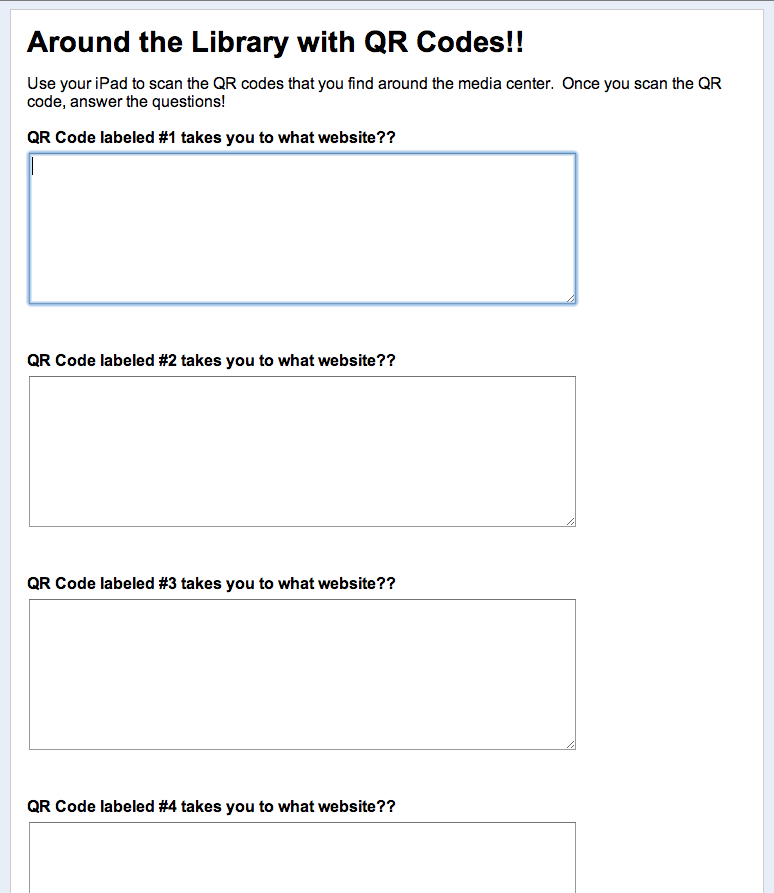
It is a new school year and we have iPads in the library!!! I traditionally start each new school year by reintroducing (introducing to new students!) the library to returning students. What a great opportunity to try out our new technology. I introduced the app Red Laser to students. This app allows the user to create QR codes that once scanned, will connect to followup websites or messages, often advertisements. It is not uncommon to see QR codes in stores and magazines. For this lesson, I created the QR codes before students arrived. I placed the QR codes in areas and on items that I wanted student to see around the library. Once I demonstrated how easy it was to scan QR codes with Red Laser, I sent students on a scavenger hunt to find the QR codes. As student located and scanned each QR code, I asked them to record what they found in a Google form. This way we could have a followup conversation about what they learned from each QR code.
Subscribe to:
Posts (Atom)